> For the complete documentation index, see [llms.txt](https://docs.world-creator.com/llms.txt). Markdown versions of documentation pages are available by appending `.md` to page URLs; this page is available as [Markdown](https://docs.world-creator.com/zh/can-kao/terrain/shape-layers/polygon.md).
# 多边形
## 概览
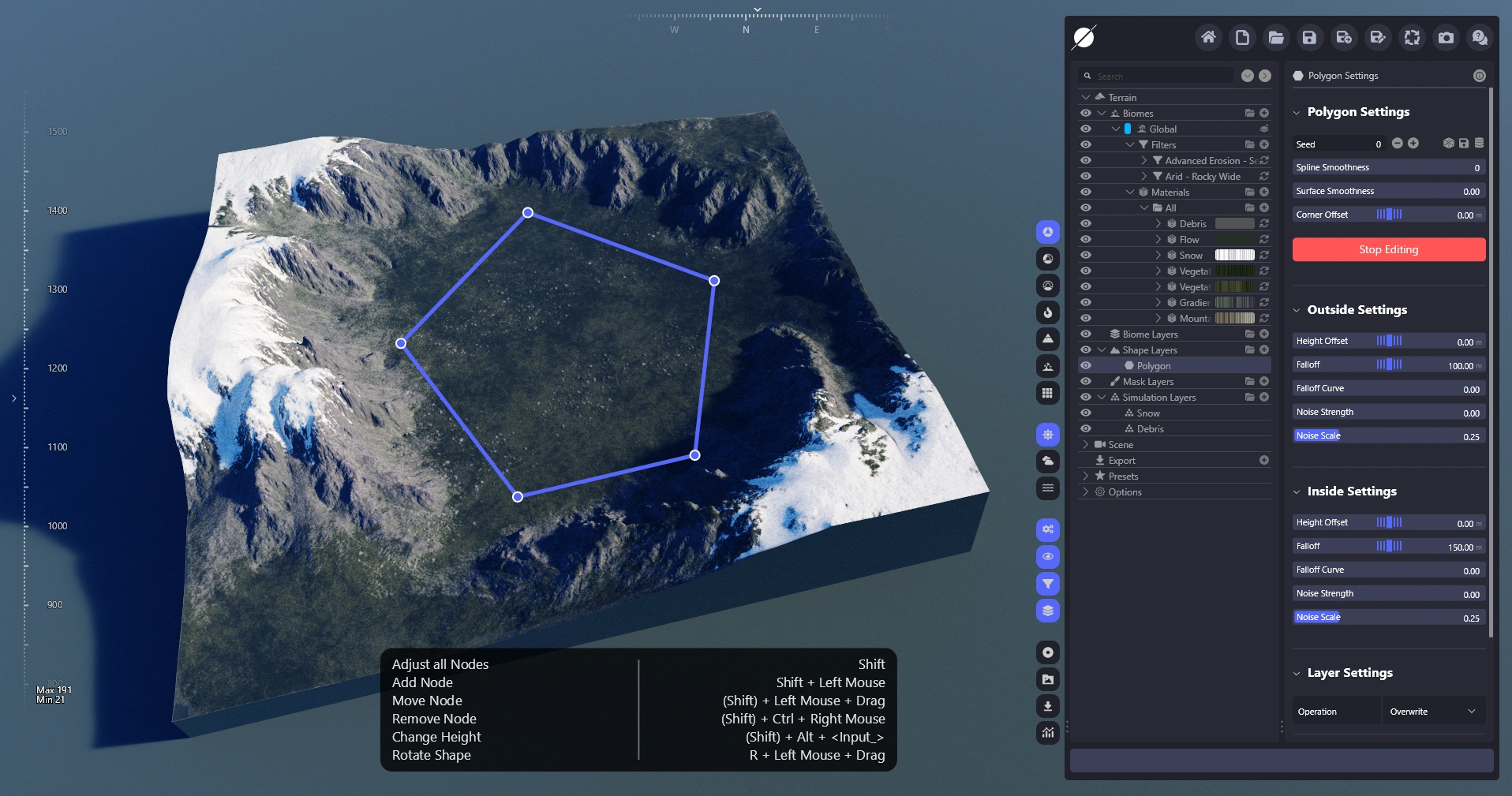
多边形形状图层允许您创建自定义多边形,并为其内外边缘分配高度,从而可以创建平坦区域、陨坑或山脉。
平坦区域
使用多边形图层创建山脉
## 视频指南
{% embed url="" %}
World Creator 指南
{% endembed %}
## 快捷键
| 一次影响整个形状 | (SHIFT) |
| -------- | ---------------------: |
| 添加节点 | Shift + 左键 |
| 移动节点 | (Shift)+ 在节点上左键拖动 |
| 删除节点 | (Shift)+ Ctrl + 在节点上右键 |
| 旋转形状 | R + 左键 + 拖动 |
## 参数
### 多边形设置
* **种子**\
图层中使用的种子。
* **样条平滑度**\
控制每个样条的步数,步数越多生成的形状越光滑、越圆润。
* **表面平滑度**\
使形状的曲率更圆滑。
* **角偏移**\
将形状向外圆滑并偏移。
### 外部设置
* **高度偏移**\
调整多边形的高度偏移。
* **外部衰减**\
控制多边形向外的衰减。
* **衰减曲线**\
调整外部衰减的陡峭程度。
* **噪声强度**\
在外部衰减中添加噪声。
* **噪声缩放**\
所添加噪声的缩放比例。
### 内部设置
* **高度偏移**\
调整多边形内部影响区域的高度偏移。
* **内部衰减**\
控制多边形向内的衰减。
* **衰减曲线**\
调整内部衰减的陡峭程度。
* **噪声强度**\
在内部衰减中添加噪声。
* **噪声缩放**\
所添加噪声的缩放比例。
---
# Agent Instructions
This documentation is published with GitBook. GitBook is the documentation platform designed so that both humans and AI agents can read, navigate, and reason over technical content effectively. Learn more at gitbook.com.
## Querying This Documentation
If you need additional information that is not directly available in this page, you can query the documentation dynamically by asking a question.
Perform an HTTP GET request on the current page URL with the `ask` query parameter, and the optional `goal` query parameter:
```
GET https://docs.world-creator.com/zh/can-kao/terrain/shape-layers/polygon.md?ask=&goal=
```
`ask` is the immediate question: it should be specific, self-contained, and written in natural language.
`goal` is optional and describes the broader end goal you are ultimately trying to accomplish on behalf of the user. GitBook uses it to tailor the answer towards what is most useful for that goal.
The response will contain a direct answer to the question and relevant excerpts and sources from the documentation.
Use this mechanism when the answer is not explicitly present in the current page, you need clarification or additional context, or you want to retrieve related documentation sections.