> For the complete documentation index, see [llms.txt](https://docs.world-creator.com/llms.txt). Markdown versions of documentation pages are available by appending `.md` to page URLs; this page is available as [Markdown](https://docs.world-creator.com/procurement-portal/page-1.md).
# Sign up as a Reseller
Since 2023 you can participate in our Reseller and Affiliate Programme. As a Reseller and Affiliate you will receive a 15% discount on all World Creator products and licences. You will also get access to our procurement portal where you can purchase World Creator products and licences for your own customers, eliminating the need for tedious email conversations to request quotes and invoices. Everything is simple, straightforward and fully automated. No waiting, just instant delivery to keep your customers happy.
To participate in our Reseller / Affiliate Programme, you must first apply. To do this, please go to the [buy page](https://www.world-creator.com/en/buy.phtml) on our website and scroll down until you see the following (alternatively you may also directly visit our [procurement portal](https://procurement.world-creator.com) to apply as a reseller / affiliate):
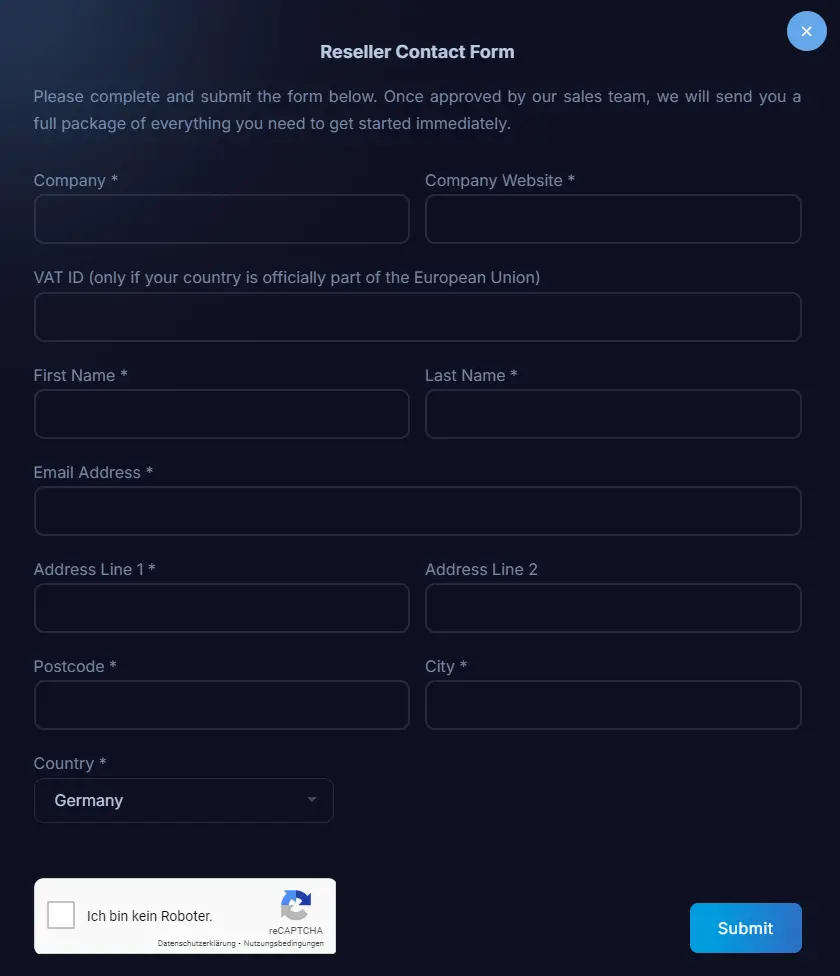
Click on the button to open the application form. Make sure you fill in everything correctly. The VAT ID is only required if you are within the EU, otherwise leave it blank.
Once you have completed all the information, submit the form. Once we have received your application, we will verify your website and email (which must match your company domain).
If everything looks correct, we will set up your affiliate / reseller account and send you your login details to the procurement portal along with further information.
---
# Agent Instructions
This documentation is published with GitBook. GitBook is the documentation platform designed so that both humans and AI agents can read, navigate, and reason over technical content effectively. Learn more at gitbook.com.
## Querying This Documentation
If you need additional information that is not directly available in this page, you can query the documentation dynamically by asking a question.
Perform an HTTP GET request on the current page URL with the `ask` query parameter, and the optional `goal` query parameter:
```
GET https://docs.world-creator.com/procurement-portal/page-1.md?ask=&goal=
```
`ask` is the immediate question: it should be specific, self-contained, and written in natural language.
`goal` is optional and describes the broader end goal you are ultimately trying to accomplish on behalf of the user. GitBook uses it to tailor the answer towards what is most useful for that goal.
The response will contain a direct answer to the question and relevant excerpts and sources from the documentation.
Use this mechanism when the answer is not explicitly present in the current page, you need clarification or additional context, or you want to retrieve related documentation sections.