| プロパティ | 説明 |
|---|---|
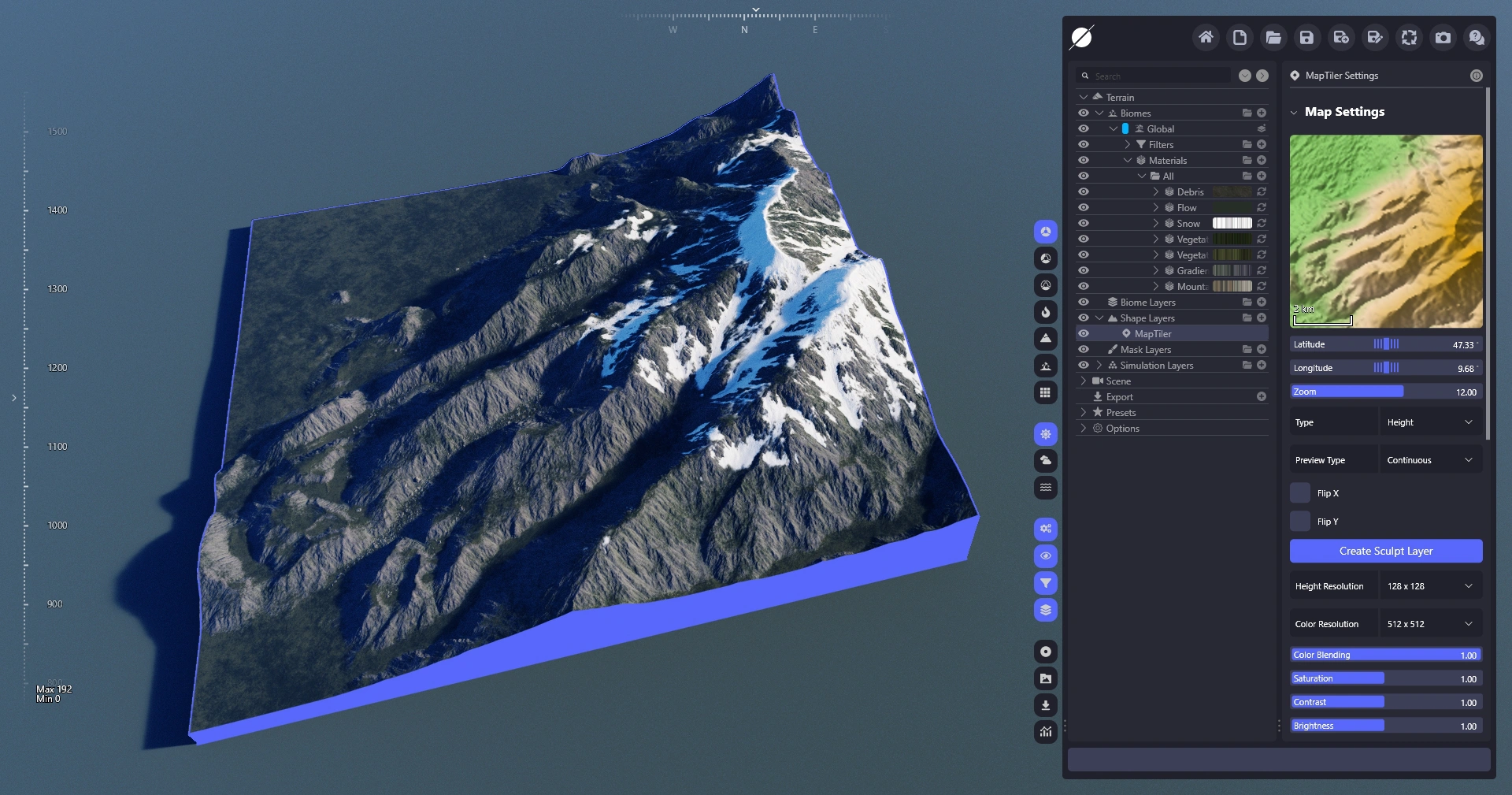
| マップウィンドウ | レイヤーがレンダリングする衛星データの領域。ドラッグ&ドロップや中ボタンクリックでのズーム操作で調整できます。 |
| 緯度 | 衛星データの座標を指定できます。 |
| 経度 | 衛星データの座標を指定できます。 |
| ズーム | 衛星データのスケールを制御します。 |
| タイプ | プレビューウィンドウのレンダーモードを切り替えます。 |
| プレビュータイプ | 衛星位置の変更がいつ更新されるかを制御します。有料の MapTiler プランを使用している場合、これが API リクエストに影響を与えることがあります。 |
| X/Y反転 | 衛星領域を反転できます。 |
| スカルプトレイヤーを作成 | 高さデータをスカルプトレイヤーに変換し、さらに編集できるようにします。 |
| 高さ解像度 | MapTiler からダウンロードする高さデータの解像度を指定します。結果として得られる Shape レイヤーの地形ディテールは、指定した レベルステップ. |
| C色解像度 | 付随するカラーマップの解像度を指定します。カラーマップは「Shape レイヤーの色を使用」トグルを有効にすることで、任意のマテリアルで使用できます。 |
| カラー合成 | カラーマップの不透明度を制御します。 |
| 彩度 | 衛星カラーの彩度を調整できます。 |
| コントラスト | 衛星カラーのコントラストを調整できます。 |
| 明るさ | 衛星カラーの明るさを調整できます。 |

 {% endstep %}
{% step %}
### World Creator 用の新しい認証情報を作成
をクリックして、 **新しい認証情報** ボタンを押して名前を入力します。次に、 **保存**.
{% endstep %}
{% step %}
### World Creator 用の新しい認証情報を作成
をクリックして、 **新しい認証情報** ボタンを押して名前を入力します。次に、 **保存**.
 {% endstep %}
{% step %}
### サービス トークンをコピー
{% endstep %}
{% step %}
### サービス トークンをコピー
 {% endstep %}
{% step %}
### WC にトークンを適用
トークンを取得したら、MapTiler オプション タブに移動してトークンを適用します。
{% endstep %}
{% step %}
### WC にトークンを適用
トークンを取得したら、MapTiler オプション タブに移動してトークンを適用します。
 {% endstep %}
{% endstepper %}
---
# Agent Instructions
This documentation is published with GitBook. GitBook is the documentation platform designed so that both humans and AI agents can read, navigate, and reason over technical content effectively. Learn more at gitbook.com.
## Querying This Documentation
If you need additional information that is not directly available in this page, you can query the documentation dynamically by asking a question.
Perform an HTTP GET request on the current page URL with the `ask` query parameter, and the optional `goal` query parameter:
```
GET https://docs.world-creator.com/ja/rifarensu/terrain/shape-layers/maptiler.md?ask=
{% endstep %}
{% endstepper %}
---
# Agent Instructions
This documentation is published with GitBook. GitBook is the documentation platform designed so that both humans and AI agents can read, navigate, and reason over technical content effectively. Learn more at gitbook.com.
## Querying This Documentation
If you need additional information that is not directly available in this page, you can query the documentation dynamically by asking a question.
Perform an HTTP GET request on the current page URL with the `ask` query parameter, and the optional `goal` query parameter:
```
GET https://docs.world-creator.com/ja/rifarensu/terrain/shape-layers/maptiler.md?ask=